
Three Ways to Ensure AI Multiplies Craft (Instead of Eroding It)
After publishing “Craft Is Your Only Moat in the Age of AI,” the most common request I received was: “Can you go deeper on the three coaching principles?” Leaders recognized the pattern — teams shipping faster but thinking less — but wanted concrete guidance on how to intervene. This guide provides that depth.
I’ll walk through each principle with real examples, implementation frameworks, and the specific coaching conversations that make the difference between teams that use AI as a multiplier and those that let it erode their capabilities.
A quick reminder of the challenge: AI lets your team produce professional-looking output without developing the judgment to evaluate whether it’s actually good. Speed without taste isn’t productivity — it’s capability decay at scale. These three principles are designed to keep your team’s judgment sharp while AI accelerates their output.
Principle 1: Aim, Then Accelerate
Why This Matters More Than You Think
Last month, I sat in while a product manager briefed a designer on a new feature. The instruction: “We need a dashboard for customer health metrics. Can you mock something up?” The designer, eager to move fast, immediately opened ChatGPT and started prompting: “Create a dashboard design for customer health tracking…”
Fifteen minutes later: a polished Figma file with charts, color-coded indicators, and clean typography. It looked both plausible and professional. It was also solving the wrong problem.
When I asked the PM, “What decision will this dashboard help someone make?” they paused. “I guess… whether to reach out to at-risk customers?” I pushed: “Who specifically? The CSM? Their manager? What’s the behavior change you need? What constraints matter: mobile access, real-time data, integration with existing tools?”
We spent thirty minutes clarifying intent. Then the designer prompted again —using the same tool, at the same speed, but with radically different output. This version was designed for CSMs to triage morning reviews on mobile, surfacing the three accounts most likely to churn that week based on engagement velocity, with one-tap escalation to their manager.
Same effort. Ten times the impact. The difference was in aim.
The Four-Question Intent Framework
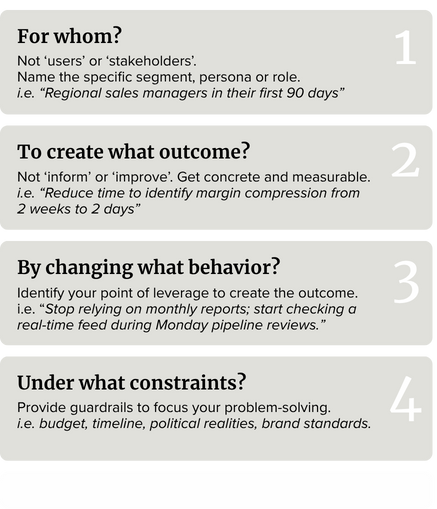
Before your team touches AI, train them to answer four key questions. Write these on a sticky note and put them on every monitor or Miro board:
How to Coach This in Practice
When someone brings you an AI-generated draft or concept, don’t start with feedback on the output. Start with intent interrogation:
You: “Before we look at this, walk me through your four questions.”
Them: “Uh, I was trying to make it more engaging for the audience.”
You: “Who specifically in the audience? What outcome? What behavior needs to change?”
Do this consistently for three weeks. Your team will start running the four questions themselves before they prompt. The quality jump will be dramatic. Not because AI got smarter, but because the input did.
What Aiming Looks Like vs. What It Doesn’t
Fuzzy aim: “Create a presentation about our Q4 strategy for the leadership team.”
Sharp aim: “Help the executive team commit to prioritizing platform stability over new features in Q4, by showing them the compound cost of technical debt in customer terms they’ll feel, knowing they’ll push back on revenue implications and we have 20 minutes max.”
The second prompt gives AI (and your team) the constraints, stakes, objections, and success criteria. It produces wildly better starting material because the aim was clear.
The ROI of Slowing Down to Aim
I know what you’re thinking: “This takes time we don’t have.” Here’s the math that changed my mind:
Fuzzy aim + fast AI = 15 minutes to first draft + 3 hours of revision + output that still misses the mark = wasted day
Sharp aim (30 minutes) + fast AI = 15 minutes to first draft + 30 minutes of refinement + output that lands = productive morning
Aiming doesn’t slow you down. It prevents you from going fast in the wrong direction.
Principle 2: Build a Pattern Library
The Problem With Starting From Scratch Every Time
A B2B sales team I worked with was redesigning their approach to executive briefings — the sessions they deliver at trade shows, on client visits, and in their own customer experience center. Smart people, strong presenters, good product knowledge. But every new briefing felt like reinventing the wheel: What structure works? What tone? How much technical depth? Demo-heavy or conversation-driven? Industry context first or product capability first?
They’d debate these questions for hours, make a choice, deliver something good, then three weeks later have the same debate for a different prospect. They were solving the same problem repeatedly… and calling it “customer-centricity.”
I asked them to review the last ten briefings they’d delivered. Then we looked for patterns: When did the “demo-first” approach work best? When did “business challenge-first” win? What differentiated the briefings that led to the next meeting versus the ones that ended with “interesting, we’ll think about it”?
We identified six distinct patterns, each tied to specific conditions: trade show drive-bys vs. pre-scheduled CX center visits, technical buyers vs. business sponsors, early exploration vs. active evaluation, familiar industry vs. new vertical. We codified them.
Now, when they prep a new briefing, they don’t debate structure. They pattern-match: “This is an active evaluation with a non-technical business sponsor in our CX center who needs confidence in our domain expertise more than feature depth. That’s Pattern 3.” Then they customize the content, not the scaffolding.
The time from briefing request to first draft decreased by 60%. Quality improved because they were spending their creative energy on what mattered — understanding the prospect’s context and tailoring the business case — not re-litigating format questions.
What a Pattern Card Looks Like
A useful pattern has four components:
Conditions: “When the goal is X and the audience is Y and the constraint is Z…”
Solution: “We prefer pattern/approach/structure A because…”
Rationale: “This works because it addresses [specific challenge] and aligns with [principle].”
Example: A real artifact or excerpt that shows the pattern in action.
Here’s a real pattern card from that sales team:
Pattern: The Confidence Builder (for scheduled CX center visits with business sponsors)
Conditions: Non-technical business sponsor, active evaluation stage, 2 hour session during visit to customer experience center, prospect needs to justify investment to their executive team.
Solution: Business-challenge-first structure. Open with their problem in their language, then build confidence through: (1) Why this challenge is costly now, (2) How companies like theirs solved it (with named references), (3) Our approach with minimal technical depth, (4) Clear path from pilot to scale.
Rationale: Business sponsors in active evaluation are building a business case for others. They need ammunition and confidence more than technical proof. Leading with product features triggers “I need to bring my technical team back.” Leading with business impact and peer validation gives them what they need to champion internally.
Example: [Link to sanitized briefing deck from prospect visit, March 2025]
How to Build Your Pattern Library
Don’t try to codify everything at once. Start with retrospective pattern mining:
Step 1: After shipping good work, ask: “What made this work well?” Not “it was good” — what specifically about the structure, tone, format, or approach made it effective?
Step 2: Identify the conditions: What was true about the goal, audience, or constraints that made this the right choice?
Step 3: Write the pattern card. Keep it to one page. Include an example.
Step 4: Store it somewhere your team actually looks. Not buried in a SharePoint folder — put it in your Notion workspace, your Slack channel, wherever your team starts new work.
Step 5: Use it. Next time similar conditions arise, point to the pattern: “This looks like a Pattern 3 situation. Start there, then customize.”
Do this for six months. You’ll have 10–15 patterns that cover 80% of your work. The remaining 20% — the truly novel problems — get your full creative attention.
What This Isn’t
Pattern libraries are not:
Templates that kill creativity: You’re codifying the scaffolding, not the content. The argument, insights, and craft still come from your team.
Rules that can’t be broken: Patterns are starting points. “This usually works when X, but if Y is true, consider Z instead.”
Busywork documentation: If no one uses it, stop building it. Useful patterns spread organically because they save time and improve outcomes.
The Compounding Advantage
Here’s what surprises many: teams with strong pattern libraries get more creative over time, not less. Why? Because they’re not burning mental energy on solved problems. They can spend it on the truly hard questions — the strategy, the insight, the brave choices that separate good work from great work.
AI makes this even more powerful. You can encode patterns into prompts: “Use Pattern 3 structure: business-challenge-first confidence builder for non-technical business sponsors. Here’s the context…” The AI applies the scaffolding, and your team focuses on the content.
Principle 3: Instrument Your Guardrails
The Manual Verification Trap
A design team I coached was spending 40% of their time on QA: checking accessibility compliance, verifying brand color values, ensuring type hierarchy, confirming contrast ratios, and validating responsive breakpoints. Important work — and soul-crushing to do manually.
Meanwhile, their senior designers were exhausted. Not from creative problem-solving, but from being the human linter for junior team output. “Did you check alt text?” “This color isn’t brand-approved.” “The hierarchy is broken on mobile.”
The juniors weren’t learning standards — they were learning to ship and wait for correction. The seniors weren’t doing senior work — they were doing QA that machines could handle.
I asked them: “What are you checking that could be automated?” They listed fifteen things. Then I asked: “What can only a human evaluate?” Different list: strategic clarity, emotional resonance, and whether the design actually solves the user’s problem.
We built instrumented guardrails, which include automated checks for accessibility, brand compliance, and technical standards. AI scored drafts against structural heuristics: clarity, tone consistency, and logical flow. Humans focus on applying taste and judgment.
Within a month, QA time dropped by 60%. Junior designers learned more quickly because they received instant feedback on standards in the flow of real work. Senior designers did senior work again. Quality improved because humans were thinking about things machines can’t evaluate.
The Two Types of Guardrails
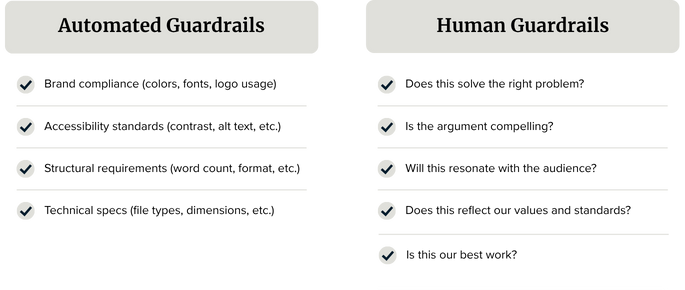
Automated guardrails catch the objective, verifiable stuff, while human guardrails evaluate the subjective, strategic stuff. AI can handle the first category entirely. It should. That’s not where craft lives.
What Good Instrumentation Looks Like in Practice
A global pharmaceutical company I work with faced a particularly thorny challenge: producing marketing assets tailored to various brands and regions in a highly regulated industry. Every piece of creative output — from patient education materials to physician detailing aids — had to undergo MLR review (Medical, Legal, Regulatory), where experts ensure content is accurate, compliant, and ethical before publication.
The MLR review process is crucial for complying with regulations from the FDA, HIPAA, and FTC, which govern the promotion of healthcare products and patient data privacy. It involves collaboration across medical affairs, legal, and regulatory teams to guarantee promotional materials are truthful, avoid misleading claims, and don’t violate patient privacy. Get it wrong, and the company faces severe penalties and damage to its brand.
The problem: MLR reviews were taking 3–4 weeks per asset. Marketing would submit materials, then wait days for feedback like “This claim needs substantiation,” “You can’t say ‘better’ without comparative data,” “Missing required safety information,” or “This image implies off-label use.”
Then they’d revise and resubmit. Rinse, repeat. Meanwhile, launch timelines slipped, campaigns missed market windows, and creative teams were demoralized by endless revision cycles.
We built instrumented guardrails using their compliance requirements:
Pre-MLR AI Compliance Check:
Brand-specific claim libraries (approved language for each product)
Required disclaimers and safety information (triggers based on content type)
Prohibited terms and imagery (red-flag lists by therapeutic area)
Substantiation requirements (every claim must reference an approved study)
Regional regulatory variations (EU vs. US vs. APAC requirements)
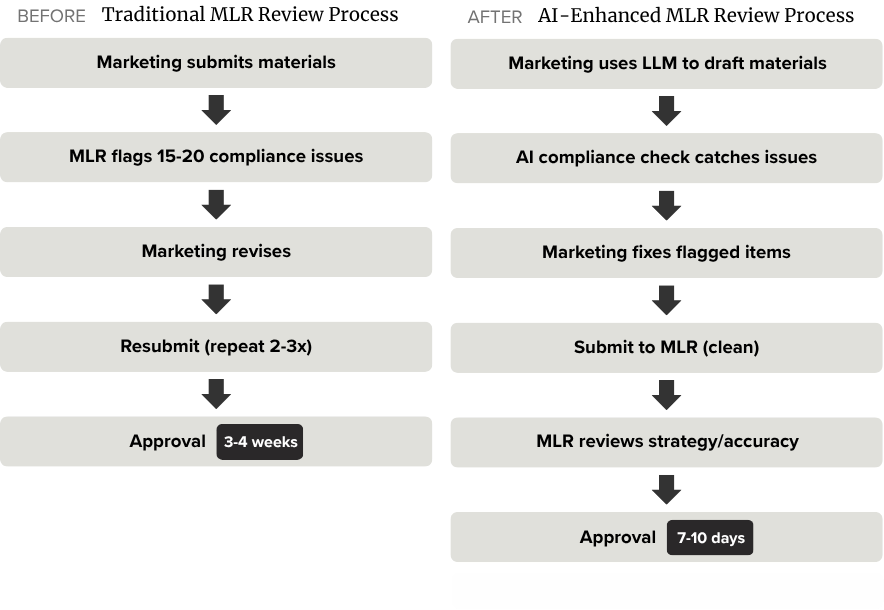
The velocity improvement was dramatic, but the quality improvement was even more significant: marketing teams learned compliance requirements more quickly because they received immediate, specific feedback. Junior copywriters internalized what “substantiated claim” meant after seeing AI flag unsubstantiated language 50 times. The MLR team could focus on genuine judgment calls — such as medical accuracy, appropriate patient populations, and therapeutic positioning — rather than catching missing disclaimers.
Most importantly, the company could move faster in regulated markets without increasing compliance risk. That’s the real leverage of instrumented guardrails.
How to Instrument Your Guardrails
Step 1: Audit what you’re checking manually
For two weeks, track every time you or your team catches an error or gives feedback. Categorize it: Is this objective/verifiable or subjective/strategic?Step 2: Build your golden set
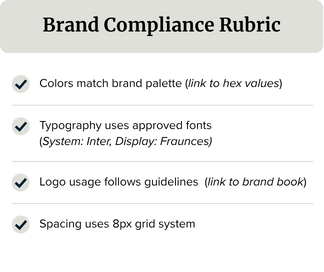
Collect 5–10 examples of excellent work. These become your reference standard. What makes them outstanding? Write criteria: “Clear hierarchy,” “Accessible to WCAG AA,” “Tone matches brand voice,” “Argument flows logically.”Step 3: Create rubrics for the objective stuff
Turn verifiable criteria into checklists or scoring rubrics.
Step 4: Automate what’s automatable
Use AI to check against rubrics. Prompt: “Review this design file description against our brand compliance rubric. Flag any violations and explain why.” Or use specialized tools such as accessibility checkers, linters, and validators.
Step 5: Train your team to run checks before submission
“Before you send this for review, run it through the accessibility checker and the brand rubric. Fix what’s flagged. Then we’ll focus review time on strategic questions.”
The Cultural Shift Required
Instrumented guardrails only work if you change how you evaluate “good work.”
Old standard: “Did you catch all the errors?”
New standard: “Did you run the checks, fix what was flagged, and make strategic choices that move us closer to our goal?”
This requires trust. Your team needs to believe that using AI to check standards isn’t “cheating” — it’s using tools appropriately so they can focus on what matters.
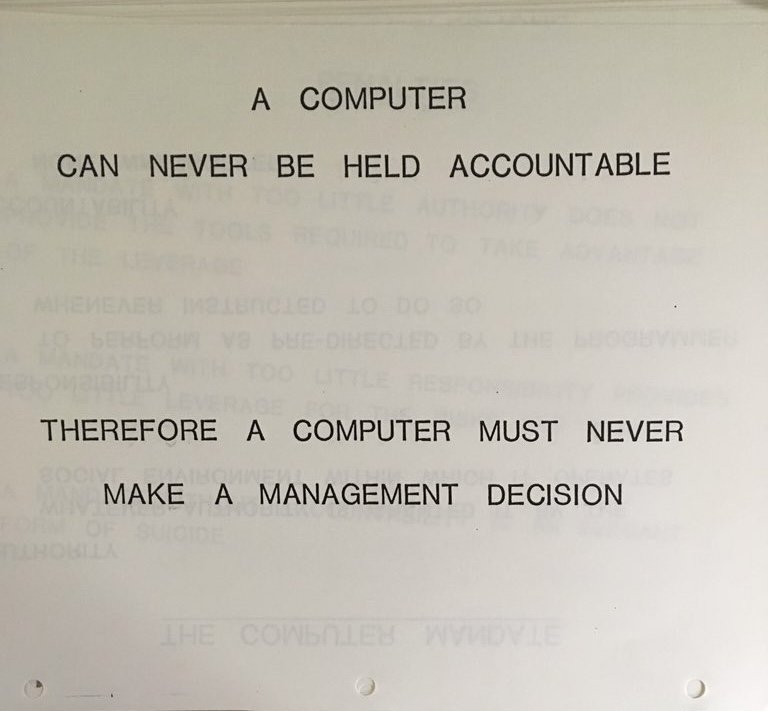
I tell teams: “If a machine can verify it, a machine should verify it. Your job is to think about what machines can’t evaluate. That’s where craft lives.”
Putting It All Together
These three principles work as a system:
Aim, then accelerate ensures AI multiplies good judgment, not fuzzy thinking.
Pattern libraries convert repeated good decisions into reusable scaffolding, freeing creative energy for novel problems.
Instrumented guardrails automate verification so humans focus on evaluation and judgment.
The result: your team moves faster and develops stronger capabilities. AI becomes a multiplier for craft, not a replacement for it.
Start With One
Don’t try to implement all three at once. Pick the principle where you’re feeling the most pain:
If your team is shipping fast but missing the mark, start with Aim, then accelerate.
If you’re solving the same problems repeatedly, start with Pattern libraries.
If QA is consuming senior capacity, start with Instrumented guardrails.
Run it for a month. Measure the impact — not just time saved, but quality improved and capability built. Then add the next principle.
The goal isn’t to slow down your team or introduce bureaucracy. It’s to make sure that when they accelerate, they’re aimed at something worth reaching — and building the judgment muscle to know the difference.
Next: In a follow-up article, I’ll show you how to encode these principles into AI-readable formats — pattern libraries and guardrails that your team can reference directly in their prompts for consistently better output.